

HRV Biofeedback Technology for Student Self-Regulation
HeartMath’s emWave® technology has been helping students ages 6 and up in thousands of schools around the world for many years. It’s in classrooms, computer labs, counseling centers and homes.





What Is HRV Biofeedback?
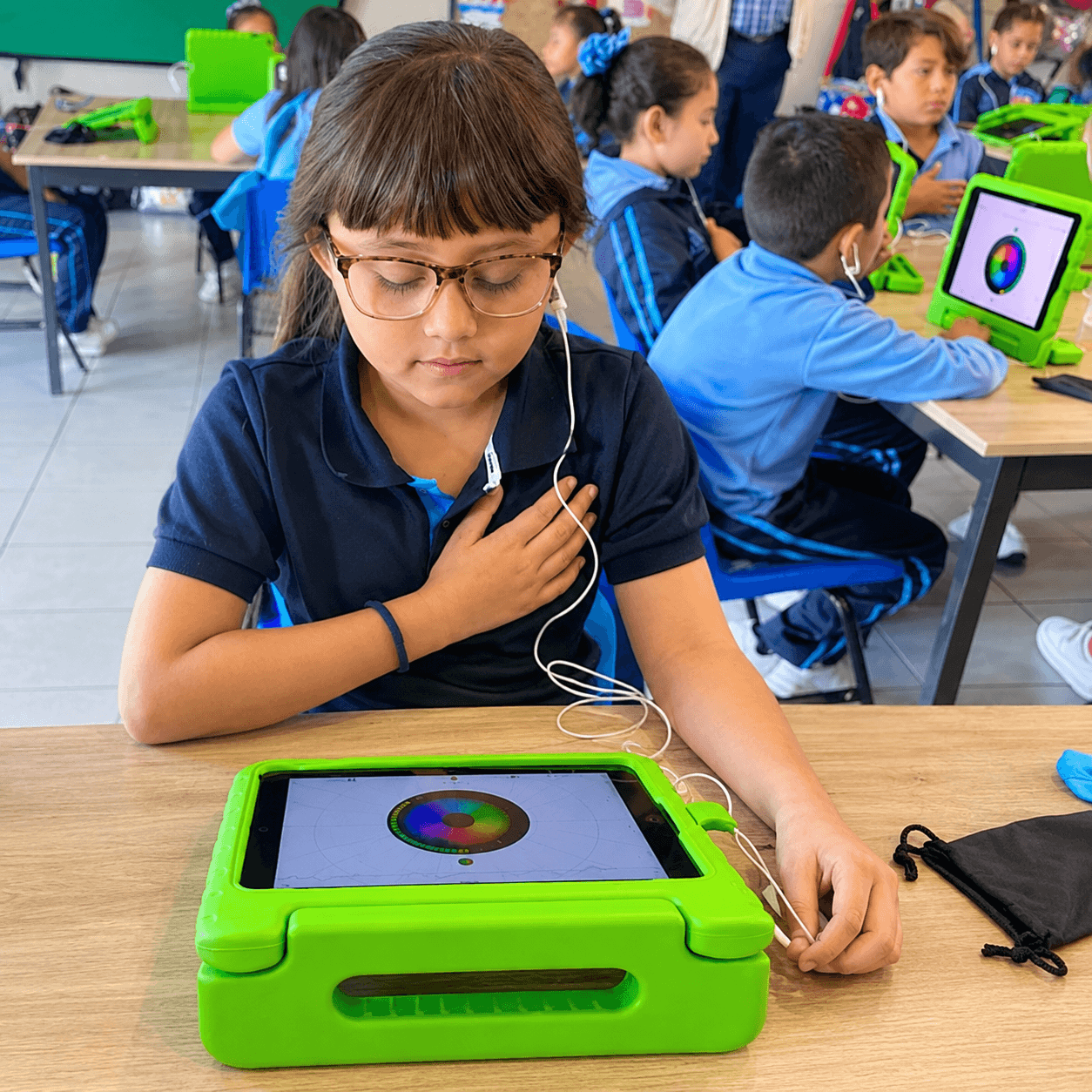
HRV biofeedback is a real-time training method that helps students observe changes in their heart rhythm and practice self-regulation. HeartMath technology uses a heart-rhythm sensor and visual feedback to help students connect their emotional state with changes in their heart rhythm and practice HeartMath self-regulation techniques.
Getting in Sync
for School and Life
Students quickly learn how to self-regulate attitudes and emotions and bring balance to their mental and emotional systems. This balanced state leads to positive behavior, improved academic performance and greater ease in social settings.
HRV biofeedback makes this practice visible by providing real-time feedback on changes in heart rhythm as students practice self-regulation techniques.This connects the existing self-regulation message with the target keyword without keyword stuffing.
emWave® Pro for Computer
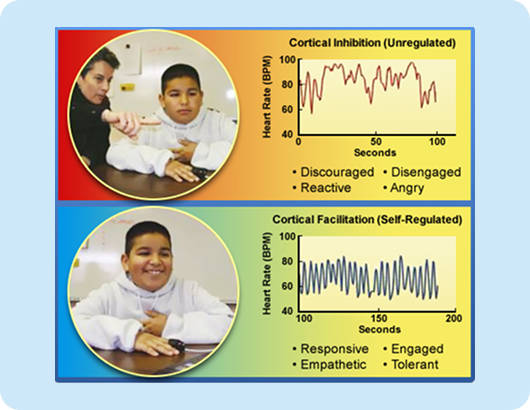
The emWave® helps students manage challenges like test anxiety, low motivation, and behavioral issues from stress or overstimulation. Negative emotions create irregular heart patterns (red), while positive ones like appreciation or empathy produce smooth patterns (blue).
This simple program uses a heart-rhythm monitor to show how emotions affect heart rhythms, supported by research. See the charts below for the difference!
How HRV Biofeedback Works
Use a simple 3-step visual layout, preferably three cards/icons.
1. Sense
A pulse sensor measures the student’s heart rhythm in real time.
2. Practice
Students use HeartMath techniques and guided breathing while viewing real-time feedback.
3. Learn
Students observe how their emotional state affects their heart rhythm and practice returning to a more balanced state.
emWave® Benefits, Features and Uses in Education
Benefits
HeartMath technology can be incorporated into different school and student-support settings, depending on the goals of the program, including the following:
- Focus and attention
- Emotional resilience
- Impulse control
- Anger management
- Motivation to succeed
- Comprehension
- Problem-solving
- Test scores
Features
- Real-time heart rate variability monitor.
- Four challenge levels to help students raise their baseline coherence levels.
- Coherence Coach®tutorial for learning and applying the Quick Coherence®
- Interactive games that make if fun for students to build focus and emotional resilience.
- Emotion Visualizer®, which provides stunning colorful images that vary according to a student’s emotional state and coherence level.
- Secure data storage showing coherence levels for session and history review.
Education uses
- Classrooms – In classrooms, educators can use the technology as a self-regulation practice alongside learning activities.
- Counseling programs – The emWave helps improve students’ emotional health. It is a versatile technology that can be incorporated into programs that address bullying, conflict resolution, test preparation, drug and alcohol prevention and more.
- After-school programs – Students supplement academic work with regular practice on the emWave to help with test preparation and decrease frustration from learning and behavioral and relationship challenges.
- Test preparation – Educators typically set up emWaves in computer labs or libraries to help students improve focus while they learn how to regulate performance inhibitors such as test and math anxiety.
- Special education classrooms – The emWave helps students improve impulse control, emotional resilience, academic focus and confidence, Students lean to overcome the emotional blocks to learning and test-taking.
- Learning and tutoring centers – The emWave serves as a support tool for students with learning disabilities and those who perform below their academic capability.
- Athletic programs and sports camps – The emWave helps teach athletes to improve focus, self-control and performance. For example, a student commented about it, “One big change is that I no longer throw my golf clubs.”

Which HeartMath Technology Is Right for Your Setting?
emWave Pro is a computer-based HRV coherence biofeedback system for Mac and Windows and supports multiple users, making it particularly relevant to computer labs and education settings.
Inner Balance combines an HRV coherence sensor with a mobile app for individual practice on compatible smartphones and tablets.
Explore the full HeartMath technology comparison to determine which option best fits your setting.
Learn more
About emWave® educational technology and how it can improve your students’ academic performance and emotional resilience by e-mailing us at [email protected] or calling (800) 711-6221
Educators Talk About Using the Technology
How to Get Started
How to Use Your Phone’s Camera as a Coherence Sensor
Joining and Creating Groups
The Science Behind emWave Self-Regulation Technology
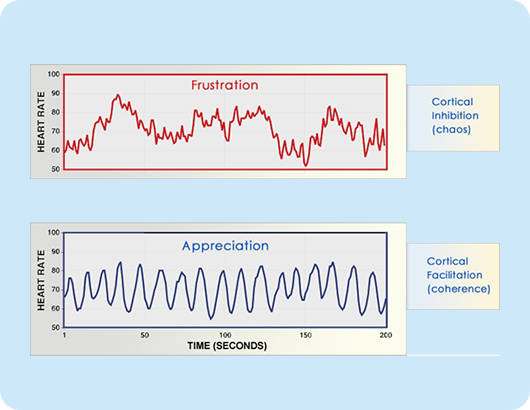
The emWave® and HeartMath System tools are backed by over 30 years of research on stress, emotions, and heart-brain connections.
The top graph shows an irregular heart-rhythm pattern linked to stress and negative emotions like anger or anxiety. The bottom graph shows a smooth, wave-like pattern typical of positive emotions like appreciation or love.
Research in Education
Research on HRV biofeedback has examined its use for self-regulation and related outcomes in educational settings. HeartMath’s research library provides additional information on the science behind HRV coherence biofeedback and its applications.
FAQs
What is HRV biofeedback for student self-regulation?
HRV biofeedback is a real-time training method that shows students how their heart rhythm changes as they practice self-regulation. A pulse sensor measures heart rate variability, and the software displays a pattern: irregular rhythms tend to go with stress or frustration, while smooth, wave-like rhythms go with calm, positive states such as appreciation. Students practice HeartMath Institute techniques and breathing while watching the feedback, which helps them learn to shift toward a more balanced state.
How is HeartMath Institute HRV biofeedback used in a classroom or counseling setting?
Classroom Integration: Educators use HRV biofeedback for brief self-regulation routines before tests, following transitions, or at designated calming stations. Counseling Applications: Practitioners utilize the technology during individual or small-group sessions to address stress, anger, test anxiety, bullying, and conflict. Session Structure: A typical session follows four steps: a sensor tracks the heart rhythm, the student practices a HeartMath Institute technique with guided breathing, and the student observes how their emotional state directly impacts the rhythm. The last step helps students identify what situations they will apply their newly-learned self-regulation tools.
How long is a typical student HRV biofeedback session?
HeartMath Institute does not set a fixed session length for students, and sessions are usually short. One school dean reported sessions of about 10 minutes with emWave Pro. A published classroom study used a 5-minute daily practice. Active Calm tools are designed for five-minute check-ins. A practical starting point is 5 to 10 minutes, adjusted to the student’s age, attention span and goals.
What equipment or devices are needed for HeartMath Institute student biofeedback?
Student biofeedback needs a HeartMath Institute sensor and compatible software or app. emWave Pro uses a USB module with a pulse ear sensor and software for Mac or Windows computers. Inner Balance Coherence Plus uses a Bluetooth ear sensor with apps for iOS 16 or later and Android 9 or later. Inner Balance Lightning uses a wired ear sensor for iPhone and iPad. emWave Pro supports multiple users, so it suits computer labs and counseling offices; Inner Balance fits individual, portable practice. For younger children aged 9 and under, or students on the autism spectrum who may be overly sensitive to an ear sensor attached to the earlobe, an optional finger sensor for the emWave Pro is recommended.
What is the difference between emWave Pro and Inner Balance for student use?
emWave Pro is computer software with a USB pulse sensor for Mac, Windows and in the near future, Chromebooks, and it saves sessions for an unlimited number of users. That makes it suited to computer labs, counseling offices and shared school or classroom use. Inner Balance pairs an ear sensor with a mobile app on a phone or tablet and saves sessions for a single user, so it fits individual, portable practice. Both provide the same core coherence tracking and training. HeartMath Institute lists emWave Pro for ages 6–18+ and Inner Balance for ages 8–18+.
How is student progress measured with HeartMath Institute biofeedback?
Progress is measured through the coherence data that the technology records. emWave Pro stores sessions with coherence levels, so educators can review each student’s history over time. The four challenge levels also let students raise their baseline coherence step by step. Educators can pair this physiological data with classroom observations, student self-reports, and SEL program pre- and post-surveys to get a fuller picture of progress.